EPF Claim Approved but Payment Missing| You Miss This Step
Many employees feel a sense of relief when they see the “Claim Approved” status on the EPFO portal. You think your PF money will reach your bank account in a few hours or days. But then nothing happens. Your EPF claim has been approved, but the payment is still pending. If this is happening to you, do not panic. Thousands of employees face the same problem every month. In most cases, the issue is minor and can be resolved easily.
In this article, we will explain why your EPF payment is delayed after approval, what step most people miss, and how you can resolve the problem fast.
What Does “EPF Claim Approved” Mean?
When you submit an EPF withdrawal claim or EPF settlement claim online through the Employees’ Provident Fund Organisation Member Portal using your UAN (Universal Account Number), your request moves through several verification stages.
If your claim status shows “Claim Approved”, it only means the Employees’ Provident Fund Organisation office has verified your details and accepted your claim request. It does not mean the money has already reached your bank account.
Many employees believe that once the status changes to “Approved,” the PF amount will arrive instantly. But the EPF payment system works in multiple steps, and the bank transfer process starts only after claim approval.
What Happens After EPF Claim Approval?
After your claim gets approved, the Employees’ Provident Fund Organisation sends a payment instruction to the State Bank of India or another authorised bank for NEFT or RTGS processing.
This payment stage is separate from the approval stage and may take anywhere from:
So, if your EPF claim status says “Approved” but your bank account still shows no payment credit, you should not panic immediately.
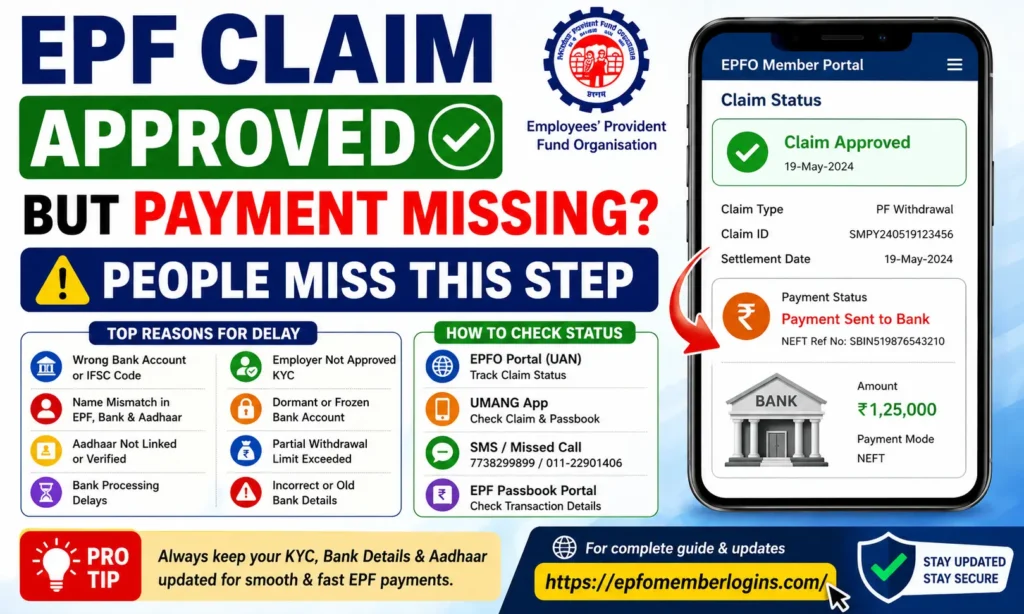
Top Reasons Your EPF Payment Is Missing
We have compiled the most common reasons why EPF members do not receive their PF payment even after their claim gets approved by the Employees’ Provident Fund Organisation. Check carefully if any of these problems apply to your case.
- Wrong Bank Account Number:
Even one wrong digit in your bank account number can cause the NEFT transfer to fail.
In such cases:
Always double-check your account number before submitting any EPF withdrawal claim.
2. Name Mismatch Between EPF, Bank, and Aadhaar:
Your name must match exactly across:
Even small spelling differences like: “Mohd” vs “Mohammad”, “Kumar S” vs “S Kumar” can stop the payment process.
This is one of the most common reasons for EPF payment rejection and bank transfer failure.
3. Wrong or Old IFSC Code:
An incorrect IFSC code can also block your PF payment. This problem became very common after bank mergers, especially when the State Bank of India merged several banks into one system.
If your old IFSC code is inactive, the NEFT transfer may bounce back to the Employees’ Provident Fund Organisation portal.
4. Aadhaar Not Linked With UAN:
According to the Employees’ Provident Fund Organisation rules, your Aadhaar number must be:
Without Aadhaar verification, even an approved EPF claim may not get disbursed.
5. Bank Processing Delay:
Sometimes the payment leaves the Employees’ Provident Fund Organisation system on time, but your bank takes extra days to process the amount.
This usually happens during:
In many cases, the money arrives automatically after a few working days.
6. Employer Has Not Approved KYC:
Your employer must approve your KYC details inside the EPFO employer portal.
If employer verification is pending for:
Then your payment can get stuck even after claim approval.
7. Dormant or Frozen Bank Account:
If your bank account is:
Then the NEFT payment will fail automatically.
We recommend contacting your bank branch to confirm your account is active and eligible for online transfers.
8. Partial Withdrawal Limit Exceeded:
For EPF advance claims, such as:
The Employees’ Provident Fund Organisation may limit the approved amount based on your eligibility.
If your requested amount exceeds the allowed limit:
Always check your eligible withdrawal limit before submitting an advance claim.
How to Check Your EPF Claim Payment Status
You do not need to visit an Employees’ Provident Fund Organisation office to track your EPF claim payment status. We will show you simple and easy ways to check whether your PF amount has been processed, sent, or delayed.
Method 1: Check Through EPFO Member Portal (UAN Portal)
This is the most common and official method to track your EPF claim online.
Step 1: Visit the EPFO Portal:
Go to the official EPFO Member Portal and log in using your:
Step 2: Open “Online Services”:
After login:
Step 3: Check Your Claim Details:
You will now see your current EPF claim status, such as:
If available, note down the NEFT transaction reference number because it helps track your bank payment.
Method 2: Track EPF Payment Using UMANG App
You can also use the UMANG app on your smartphone.
UMANG stands for Unified Mobile Application for New-age Governance and provides many government services in one place.
How To Use UMANG App:
This method is useful if you want to track your EPF claim without using a laptop or desktop computer.
Method 3: EPFO SMS and Missed Call Service
The Employees’ Provident Fund Organisation also provides SMS and missed call services for quick updates.
EPFO SMS Service:
Send this SMS from your UAN-registered mobile number: EPFOHO UAN ENG
Send it to: 7738299899
You will receive details about your PF account and claim status.
EPFO Missed Call Service:
Give a missed call to: 011-22901406
Make sure your mobile number is linked to your UAN.
EPFO Toll-Free Helpline:
You can also contact the EPFO helpdesk at: 1800-118-005 for claim and payment support.
Method 4: Check Through EPF Passbook Portal
Another useful method is checking your EPF passbook online.
Visit the official EPF Passbook Portal and log in using your UAN and password.
What To Check Inside the Passbook?
Check whether:
If your EPF balance is reduced but the money is not showing in your bank account, it usually means the payment is still in transit through NEFT processing.
How to Fix the Missing EPF Payment
If the normal waiting period is over and you still have not received your PF amount, do not ignore the issue. We recommend following these troubleshooting steps one by one to find the real reason behind the delay.
1. Verify Your KYC Details Carefully
First, log in to the official EPFO UAN Portal using your UAN and password.
Now go to: Manage > KYC
Check whether your:
are showing “Approved” status.
If any detail still shows:
Then your payment may get delayed or rejected. Always ensure all KYC documents are fully verified inside the Employees’ Provident Fund Organisation portal before submitting your claim.
2. Get the NEFT Reference Number
Open your EPF claim status page and look for the:
This number helps track your PF payment directly through the banking system.
You can:
And ask them to check the NEFT UTR number. If the bank cannot find any transaction, the payment may have:
3. Contact the EPFO Helpline
If you still cannot track the payment, contact the Employees’ Provident Fund Organisation support team directly.
EPFO Toll-Free Helpline:
Keep these details ready before calling:
Ask the EPFO officer whether:
4. Update Your Bank Account Details If Needed
If your bank account information is incorrect, you must update it immediately.
Inside the UAN portal:
Go to: Manage > KYC
Update your:
After updating, your employer must approve the new bank account details again. Without employer approval, the updated account will not become active for EPF payments.
5. Visit Your Nearest EPFO Regional Office
If online support does not solve the issue, visit your nearest Employees’ Provident Fund Organisation Regional Office personally.
Carry these documents with you:
Request the officer to check your:
Sometimes, direct office verification solves the issue much faster than waiting online.
Documents You Need to Keep Ready
We recommend keeping all of the following documents ready before you contact EPFO about a missing payment. This makes the process faster and avoids back-and-forth delays.
Conclusion
Missing EPF payment after claim approval is a common issue, and in most cases, it is not a serious problem. The delay usually happens because of minor mistakes in KYC details, bank account verification, Aadhaar linking, or NEFT processing delays.
We recommend that you always double-check your details before submitting any claim on the EPFO UAN Portal. A fully verified profile inside the Employees’ Provident Fund Organisation system helps ensure smooth and fast payment without delays.
If your payment is still missing after approval, follow the steps we shared, especially checking your NEFT/UTR reference number and confirming your bank details. In most cases, the issue gets resolved once the correct mismatch is identified. Stay patient, track your claim regularly, and ensure your KYC and bank details are always updated to avoid future delays.